
Wipe
Know weeks before your Mac runs out of space.
Wipe lives in your menu bar, warns you weeks before the disk fills, names what is growing, from Docker images to node_modules, and clears what your tools leave behind.
Clean 100 GB free. Then $19 once, with free updates for life. macOS 14 or later.
See the day your disk fills.
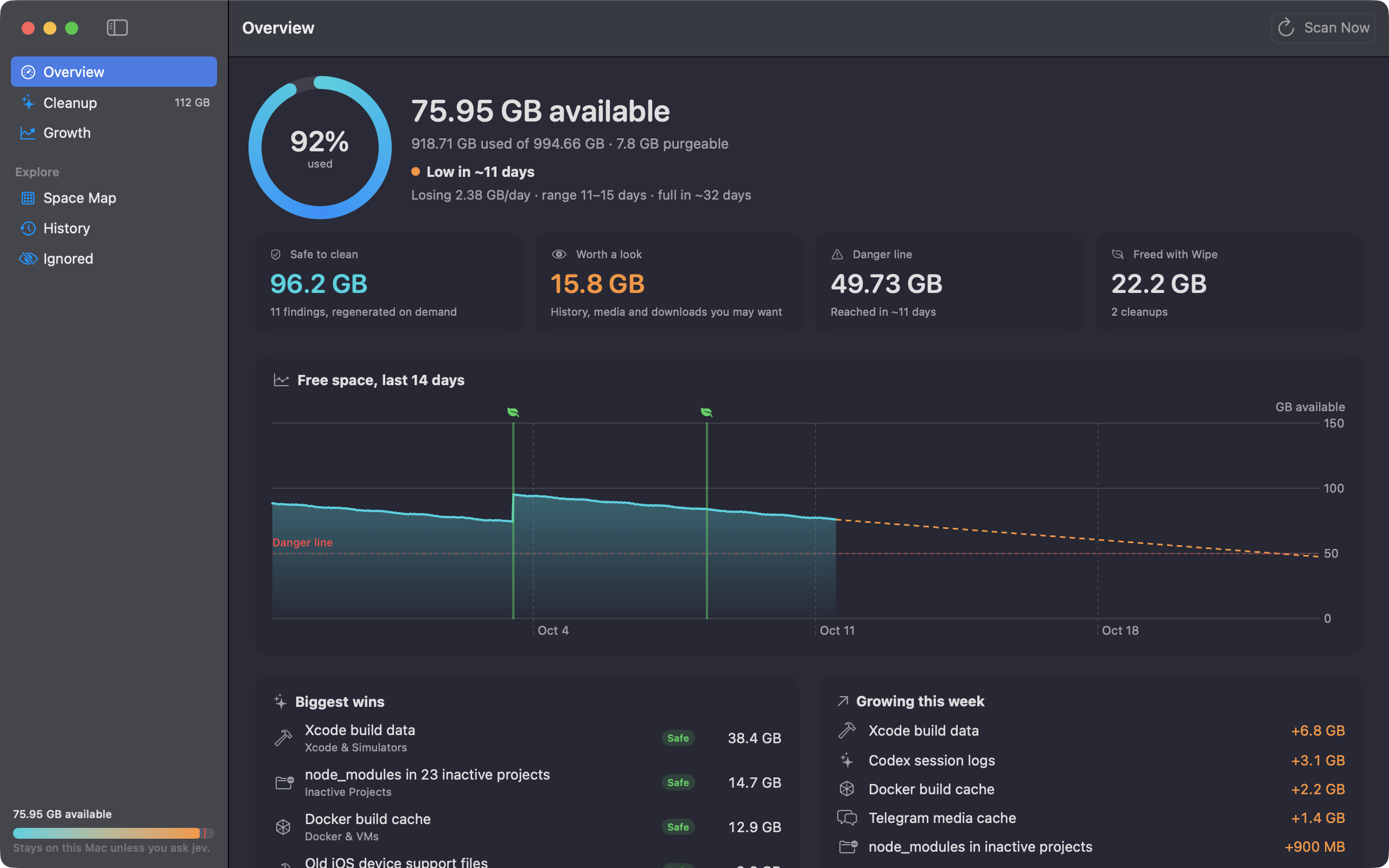
Wipe samples free space every 15 minutes and fits a trend that ignores the jumps your cleanups cause. The first alert comes three weeks before you cross the danger line, then at two weeks, one week, three days and one day. Each one names what grew the most that week, including Downloads and any folder you track. The Overview also breaks down System Data and tells you whether the next macOS update fits.
Find what your tools leave behind.
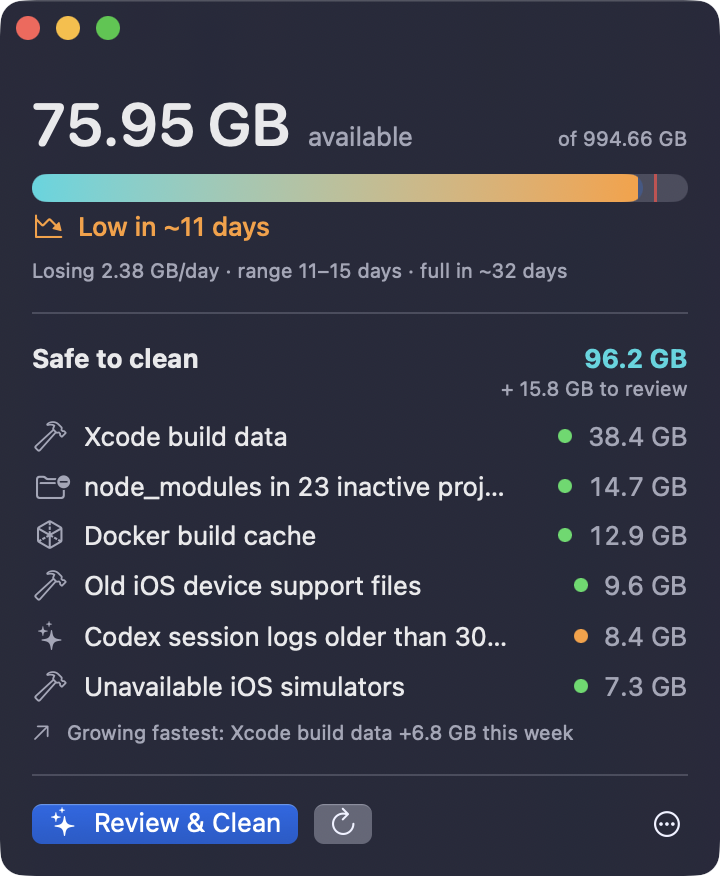
Wipe checks 243 locations and explains each finding before you act. Pin the Safe items you always clear, and Quick Cleanup moves them to the Trash from the menu bar.
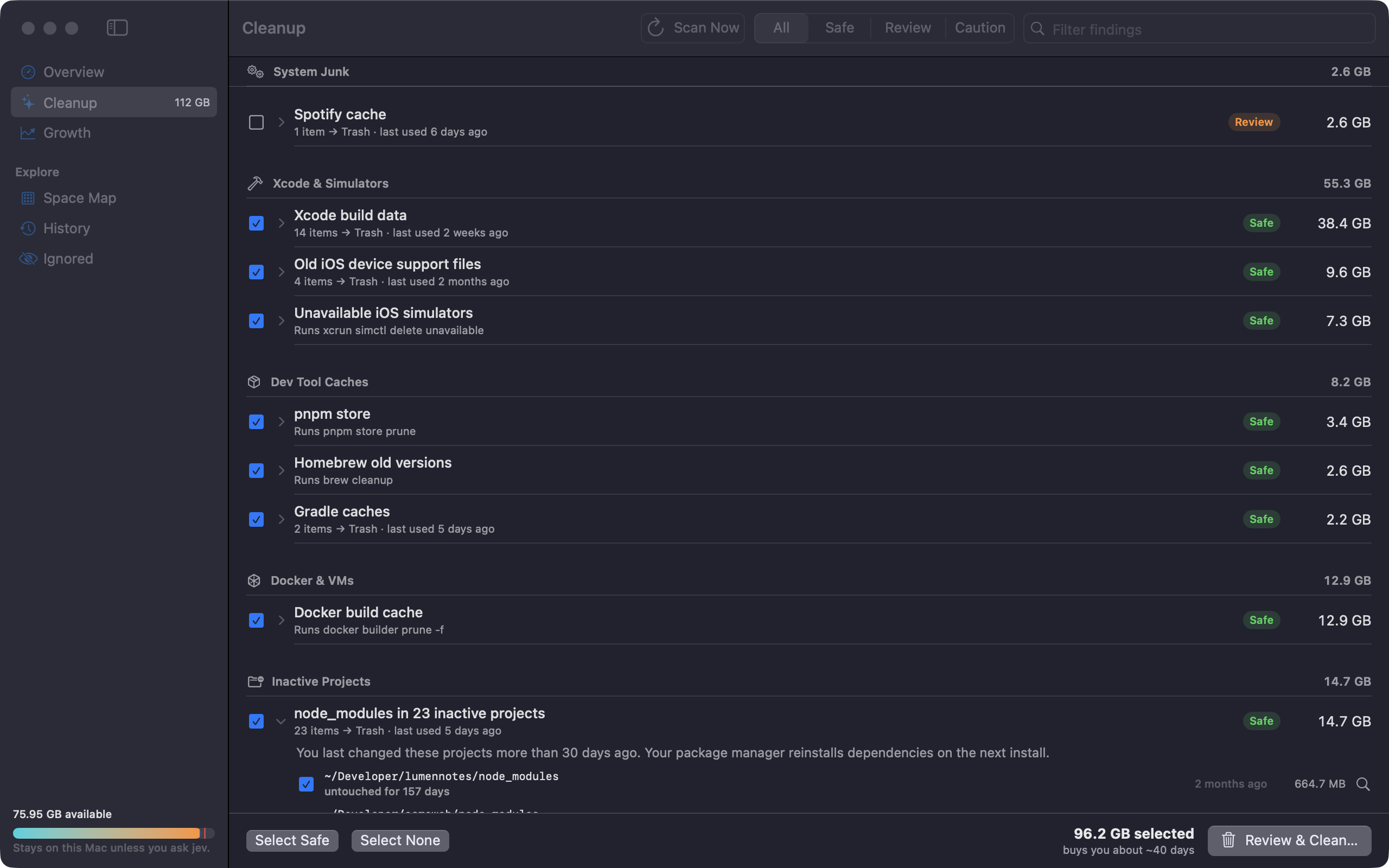
- Xcode build data, simulators and device support
- npm, pnpm, Yarn, uv, Cargo and Go caches
- Docker build cache and VM disks
- Old Claude Code, Codex and Cursor versions
- Telegram, WhatsApp and Messages media
- Stale node_modules in projects you stopped touching
See where every gigabyte went.
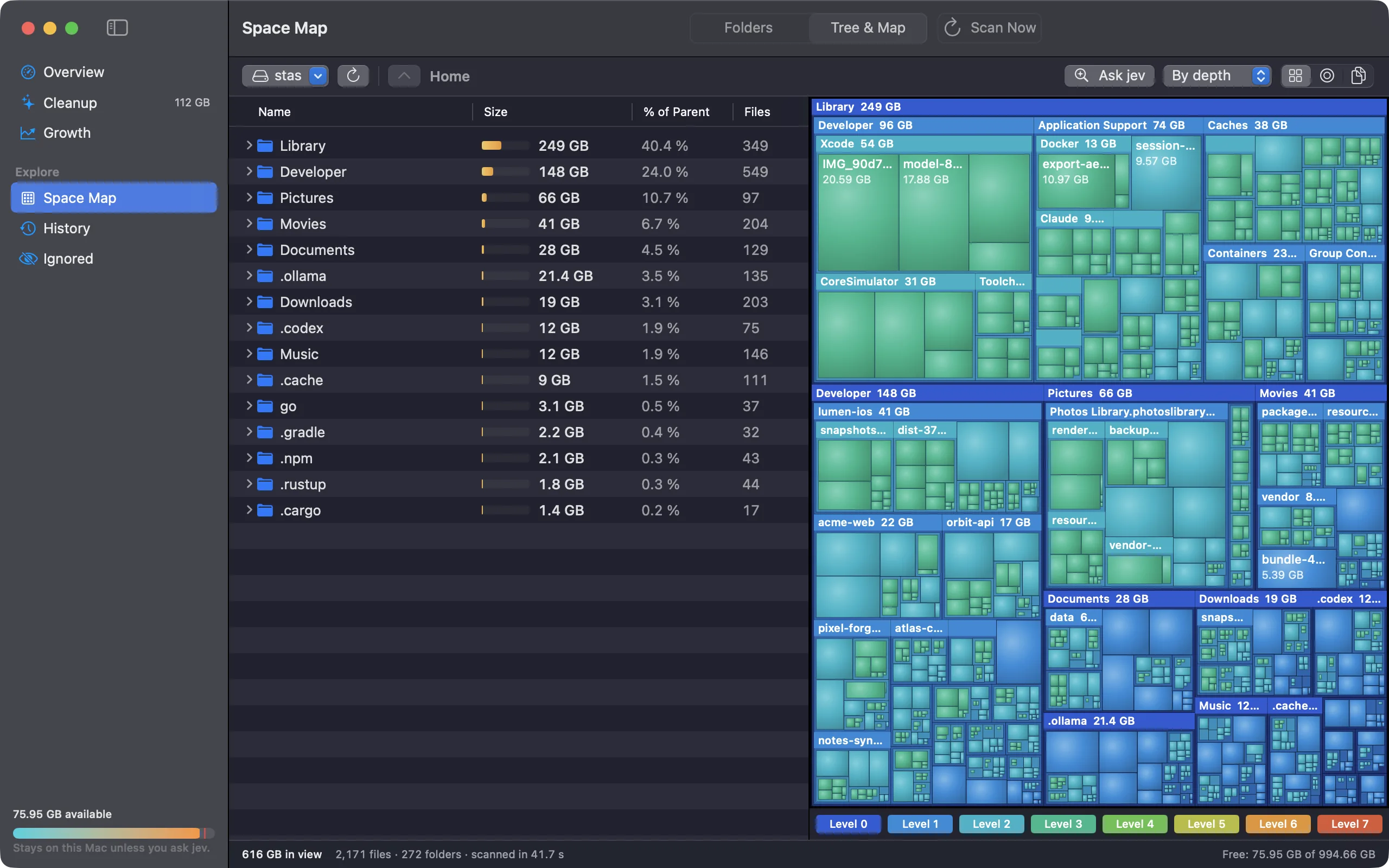
Scan any folder into a tree, a treemap and a sunburst, and ask AI what a folder holds. Below is Wipe on demo data: click its buttons to switch charts, open other sections, run a cleanup or ask AI.
Wipe counts real bytes and asks before it acts.
- Clone-aware sizes. Other cleaners counted 381 leaked Chrome copies as 552 GB; Wipe measured what deleting them frees: 3 GB.
- Trash first. Wipe moves files to the Trash and runs each tool's own cleaner, and only after you approve.
- Open apps stay untouched. Wipe skips the caches of apps you have open, such as Slack or Chrome, and offers to quit them. Right before it cleans, it checks again.
- Guard rails. Wipe refuses system folders, keychains, iCloud Drive, photo libraries and anything inside a .git folder.
- Local by default. No account and no analytics. Wipe checks wipemac.app for updates, checks your license with Polar once a week, and sends one folder's metadata to the AI only when you click Ask AI.
Questions, answered.
How Wipe decides what is safe, what it sends over the network, and how the license works.
The app
What does Wipe do?
Wipe sits in your menu bar and shows your free space. It samples the disk every 15 minutes, fits a trend over the last day, week and month, and tells you the day you will cross the danger line: 15 GB or 5% of the disk, whichever is larger. It warns you weeks ahead and names what is growing.
Every 6 hours it scans for space you can reclaim, and Space Map shows where every gigabyte sits.
When does Wipe warn me?
Three weeks before the forecast reaches the danger line, then at two weeks, one week, three days and one day. Each alert names the folders that grew the most that week, such as a Docker disk image or the node_modules of a project you work on every day, and tells you how much safe cleanup Wipe found.
The first forecast appears after about 6 hours of samples, labeled as an early estimate. Alerts wait for a full week of samples, so one busy day can't set one off. You can move the first alert anywhere from 3 to 60 days ahead in Settings.
What does Wipe find?
Over 230 cleanup rules plus specialised detectors look for:
- package manager caches: npm, pnpm, Yarn, Cargo, Go, pip, uv, Gradle, CocoaPods, Homebrew
- Xcode DerivedData, unavailable simulators and old device support files
node_modules,targetand.venvfolders in projects you have not touched for 30 days, and only folders git ignores- old versions left by AI tools such as Claude Code, Codex and cursor-agent, plus Playwright browsers
- leaked Chrome
code_sign_clonecopies, Docker and VM disks - Telegram, WhatsApp and Messages media, iOS backups, duplicate downloads and old installers
Can I track my own folders?
Yes. Click Track Folder… in Growth, or right-click a folder in Space Map and choose Track in Growth. Wipe measures tracked folders after each scan, shows how much they grew, and names them in alerts.
It also tracks Downloads whenever it holds files, and the folders AI coding tools fill, such as Claude Code jobs and Codex sessions. Tracked folders never become cleanup items.
What is Quick Cleanup?
A one-click cleanup of the Safe items you always clear. Tick "Always include in Quick Cleanup" in the Review sheet or in a finding's menu. The menu bar panel then lists those items with their total, and Clean, plus one confirm, moves them to the Trash.
Quick Cleanup runs the same checks as a full cleanup: it skips caches of apps you have open and files that changed since the scan.
Which Macs does Wipe run on?
macOS 14 Sonoma or later, on Apple silicon and Intel. One download covers both.
Will Wipe slow my Mac down?
Sampling free space costs one system call every 15 minutes. The full scan runs every 6 hours, and you can change both intervals in Settings. Space Map scans only when you open it and pick a folder.
Why does Wipe report less than other cleaners?
APFS lets files share blocks. Most tools see clones and hard links as separate copies and count the same bytes many times. Wipe counts allocated blocks, counts each hard link once, and treats a clone family as one: it reports space as freed only when you select every clone.
One example: 381 leaked Chrome clones occupy 3 GB, while du and other cleaners report over 500 GB.
What is Space Map?
A TreeSize-style view of any folder: a table with size bars beside a treemap, a sunburst or a file-type breakdown. Double-click a folder to zoom in and use the breadcrumb to go back. Right-click an item to move it to the Trash or ask AI about it.
Safety and privacy
Is Wipe a secure-erase or file-shredding tool?
No. Wipe moves files to the Trash, so you can put them back, and it clears tool caches with the tool's own cleanup command, such as brew cleanup. It does not overwrite or shred anything.
Can Wipe delete something I need?
Wipe deletes nothing without your approval. Every finding carries a level:
- Safe: caches and build output that tools recreate on demand. Only these start ticked.
- Review: files with history you may want, such as chat media, sessions and downloads.
- Caution: large and slow to recreate, such as AI models and VM disks. Wipe points them out.
Files go to the Trash, so you can put them back. Tool caches get cleared with the tool's own command, such as brew cleanup or xcrun simctl delete unavailable. A guard refuses system folders, your top-level home folders, keychains, iCloud Drive, photo libraries, git internals and any path that a symlink redirects.
Does Wipe clean caches of apps I have open?
No. When the app that owns a cache is running, such as Slack or Chrome, Wipe marks the item "In use by Slack", leaves it unticked and offers a Quit button. Deleting a cache under a running app frees nothing until the app quits, and some apps misbehave.
Right before it moves anything to the Trash, Wipe checks again and skips files that changed since the scan.
Why does Wipe ask for Full Disk Access?
macOS hides Messages, Mail, Telegram, WhatsApp, the Trash and app containers until you grant access. One grant covers them all, so macOS stops asking folder by folder. Wipe works without it but finds less.
Does Wipe read my files?
Wipe reads sizes, dates and names. It opens file contents in two cases, both on your Mac: it hashes files in Downloads to spot duplicates, and it reads small property lists to name backups and apps. Nothing about your files leaves your Mac unless you click Ask AI.
What does Wipe send over the network?
Three things, and no analytics:
- Updates: one check of wipemac.app a day.
- License: activation, then a weekly check with Polar at api.polar.sh. Wipe sends your license key and a hashed machine ID.
- Ask AI: one folder's metadata, sent to wipemac.app only when you click it. With your own OpenRouter key, your Mac calls openrouter.ai directly instead.
The privacy page lists every host the app and this site contact.
What is Ask AI, and what does it see?
Ask AI uses a decision model on OpenRouter. Right-click a folder in Space Map and it answers three questions: what the folder holds, how safe deleting it is, and what you would lose.
Wipe sends the folder path with your home shortened to ~, its size, file and folder counts, file-type shares and up to 8 child folder names. It never sends file contents. Every Mac gets 3 free answers, and a license includes 200 a month. Developers can use their own OpenRouter key through the Keychain item wipe-jev.
Pricing and license
What is free?
Monitoring, forecasts, scans and Space Map stay free. Cleanup is free until Wipe has freed 100 GB on your Mac. Files Wipe moves to the Trash count toward the 100 GB, and the cleanup that crosses 100 GB finishes. After that, Wipe asks for a license before the next cleanup.
How much is a license?
$19, once. It is not a subscription, and every future update is free. Polar handles checkout, receipts and sales tax.
What does the license add?
Unlimited cleanup and 200 AI answers a month on one Mac. The count resets on the 1st.
How many Macs does a license cover?
One. To move it, click Deactivate This Mac in Settings, then License, or free the activation on your Polar purchase page. Then activate on the new Mac.
Does the license work offline?
Yes. Wipe checks the license with Polar once a week and keeps working for 30 days without a connection.
Install and updates
macOS asks me to confirm Wipe. Is that normal?
Yes. Wipe is signed with its own certificate but not yet notarized by Apple, so macOS asks once on first launch. Open System Settings, then Privacy & Security, and click Open Anyway. Updates install without that step.
How do updates work?
Wipe checks wipemac.app once a day. When a new version is out, its panel shows Update available, and one click installs it. Wipe verifies each update's EdDSA signature before unpacking it and refuses anything unsigned.
How do I uninstall Wipe?
If you want to use your license on another Mac, deactivate it in Settings first. Quit Wipe from its menu and drag it from Applications to the Trash. To remove its history as well, delete ~/Library/Application Support/Wipe.
Clean 100 GB on us.
Download Wipe and free up to 100 GB at no cost. A $19 license unlocks unlimited cleanup and AI answers on one Mac. You pay once, and updates stay free for life.
On first launch, macOS may ask you to confirm Wipe. Open System Settings, then Privacy & Security, and click Open Anyway.